Taming Swift 6 Concurrency: My Battle with @MainActor, Sendable, and nonisolated
The Moment Everything Broke
It was a Wednesday evening. My macOS time-tracking app, DeskTimers, was compiling perfectly. The activity tracker worked. The sync engine was solid. The toast notifications were smooth. Everything was fine.
Then I did it. I opened Xcode, went to Build Settings, and changed Swift Language Version to Swift 6.

The errors were unlike anything I had seen before. Not the usual "missing semicolon" or "type mismatch" errors. These were concurrency errors — errors about actor isolation, Sendable conformance, and nonisolated contexts. Error messages that felt like they were written in a different language.
I went to YouTube. I searched "Swift 6 concurrency tutorial." I found videos that said "just add @Sendable" or "just mark it @MainActor." None of them explained why. None of them had a real production app with real problems.
This is the blog post I wish existed when I started. The complete, honest, no-shortcuts story of making a real app compile under Swift 6 strict concurrency.
What I Was Building
DeskTimers is a macOS MenuBarExtra app that tracks what apps you use throughout the day. It sits in your menu bar, monitors which application is active, captures window titles, and if you're in a browser, it records the URL and open tabs using AppleScript.
The architecture involves several moving pieces:
- ActivityTrackingService — Polls the active window every 3 seconds using macOS Accessibility APIs
- BrowserTrackerService — Runs AppleScript to get browser tabs and URLs from 9+ browsers
- WindowTrackerService — Uses
AXUIElementAPIs to read window titles - SyncManager — Batches activity records and syncs them to the server every 5 minutes
- NetworkMonitor — Watches for connectivity changes and triggers sync when back online
- SwiftData — Local-first persistence so no data is lost when offline
All of this works together across multiple threads. The activity tracker runs timers. The browser tracker executes AppleScript on background threads. The sync manager makes network requests. The UI needs to stay responsive on the main thread.
This is exactly the kind of app that Swift 6 strict concurrency was designed for. And exactly the kind that breaks spectacularly when you turn it on.
First Wave: 40+ Errors
The first build after enabling Swift 6 was brutal. The errors came in waves, each one more confusing than the last. Here are the three categories that dominated:
Category 1: "Main actor-isolated property cannot be mutated from a non-isolated context"
Compiler Error
Main actor-isolated property 'isTracking' can not be mutated from a Sendable closure
This hit everywhere I used Timer.scheduledTimer. The timer's closure runs on a different context, and Swift 6 caught that it was touching @Published properties without being on the main actor.
The old code:
// ❌ Swift 6 error: closure is not MainActor-isolated
pollTimer = Timer.scheduledTimer(
    withTimeInterval: 3.0, repeats: true
) { [weak self] _ in
    self?.trackCurrentActivity()  // Touching @MainActor state!
}
The fix:
// ✅ Wrap in Task to hop back to MainActor
pollTimer = Timer.scheduledTimer(
    withTimeInterval: 3.0, repeats: true
) { [weak self] _ in
    Task { @MainActor [weak self] in
        self?.trackCurrentActivity()
    }
}
Key Insight
Timer closures are not MainActor-isolated. Even if the class is @MainActor, the closure escapes to a different context. You need to explicitly hop back with Task { @MainActor in }.Category 2: "Reference to var is not concurrency-safe"
Compiler Error
Reference to var 'kAXTrustedCheckOptionPrompt' is not concurrency-safe because it involves shared mutable state
This one surprised me. kAXTrustedCheckOptionPrompt is a system constant from Apple's Accessibility framework. But Swift 6 sees it as a global mutable variable — shared state that could be accessed from multiple threads.
// ❌ Swift 6 doesn't trust this system constant
let options = [kAXTrustedCheckOptionPrompt: true] as CFDictionary

// ✅ Use the string literal directly (we know the value)
let options = ["AXTrustedCheckOptionPrompt": true] as CFDictionary
Category 3: The Cryptic Codable Error
Compiler Error
Main actor-isolated conformance of 'AuthResponse' to 'Decodable' cannot satisfy conformance requirement for a Sendable type parameter
This was the one that nearly broke me. It appeared when my BaseService tried to decode API responses. The error message made no sense at first. Why would Decodable be related to MainActor?
This error took hours to fully understand, and it turned out to be connected to a hidden build setting I didn't even know existed. More on that later.
Understanding @MainActor
Before Swift 6, @MainActor was a suggestion. The compiler would warn you but still build. In Swift 6, it's an enforced guarantee. If a property or method is marked @MainActor, it can only be accessed from the main actor.
In my app, all UI-related classes needed @MainActor because they update @Published properties that drive SwiftUI views:
@MainActor
final class ActivityTrackingService: ObservableObject {
    @Published private(set) var isTracking = false
    @Published private(set) var currentRecord: ActivityRecord?

    // All methods here run on the main actor
    func startTracking() { ... }
    func stopTracking() { ... }
}
But there was a catch. My BrowserTrackerService is also @MainActor (because it accesses UI caches and state), but it has one method that must run off the main thread — executing AppleScript, which can block for seconds:
@MainActor
final class BrowserTrackerService {
    // This method opts OUT of MainActor isolation
    private nonisolated func runAppleScript(_ script: String) async -> String? {
        return await withCheckedContinuation { continuation in
            DispatchQueue.global(qos: .userInitiated).async {
                // AppleScript runs on background thread
                let output = scriptObject.executeAndReturnError(&error)
                continuation.resume(returning: output.stringValue)
            }
        }
    }
}
Key Insight
@MainActoron a class isolates everything inside it. Usenonisolatedon specific methods that need to escape the main thread. This is the only legitimate use ofnonisolatedon methods — opting out of an actor-isolated class.
The Sendable Puzzle
Here's where it gets interesting. Sendable is Swift's way of saying: "This type is safe to pass across thread boundaries."
The question I kept asking was: "Do I need to write Sendable on every struct?"
The answer surprised me: not always, because Swift auto-infers it for structs.
// Swift automatically infers Sendable for this struct
// because ALL its properties are Sendable types
struct User: Codable {
    let id: String       // String is Sendable ✅
    let name: String     // String is Sendable ✅
    let email: String    // String is Sendable ✅
}
// Compiler knows User is Sendable — no need to write it!
But I still write Sendable explicitly on my API models. Why? Documentation. It tells other developers (and my future self): "Yes, I've thought about this. This type is intentionally safe to send across actors."
// Explicit Sendable — serves as documentation
struct User: Codable, Sendable {
    let id: String
    let name: String
    let email: String
}
When classes break Sendable
Classes are different. They're reference types — passed by reference, not copied. Multiple threads can hold a reference to the same instance and mutate it simultaneously. That's a data race.
// ❌ This class is NOT Sendable
class UserManager {
    var currentUser: User?  // Mutable shared state!
}

// Thread A: userManager.currentUser = alice
// Thread B: userManager.currentUser = bob    💥 Data race!
For my BaseService, I used @unchecked Sendable because I know URLSession.shared is internally thread-safe, even though the compiler can't verify it:
struct BaseService: BaseServiceProtocol, @unchecked Sendable {
    private let session: URLSession     // Thread-safe internally
    private let decoder: JSONDecoder    // Only used within methods
    private let encoder: JSONEncoder    // Only used within methods
}
Warning
@unchecked Sendable is you telling the compiler "trust me." Use it sparingly, and only when you're genuinely sure the type is thread-safe. If you're wrong, you get runtime crashes instead of compile-time errors.The nonisolated Revelation
This is where the real "aha moment" happened. I kept seeing suggestions to add nonisolated to my model structs:
nonisolated struct AuthModel: Codable, Sendable {
    var email: String
    var password: String
}
My first reaction: "What does nonisolated even mean on a struct? And isn't it dangerous?"
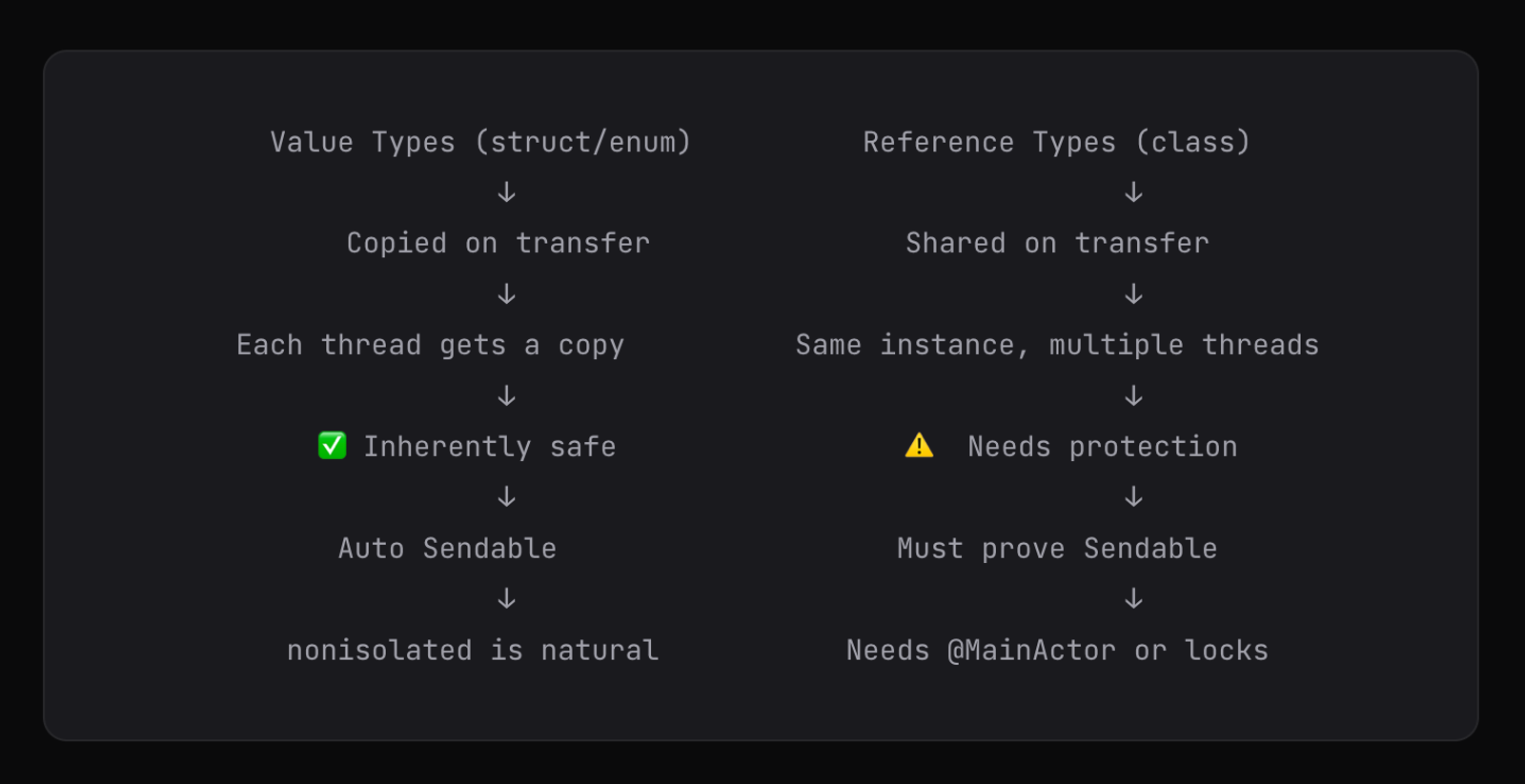
Here's what I learned: nonisolated means "this type is not bound to any actor." It can be created, used, encoded, and decoded from any thread or actor context.
For structs, this is perfectly safe because of value semantics. When you pass a struct across threads, Swift copies it. Each thread gets its own independent copy. There's no shared mutable state, so there's no data race.
The Hidden Build Setting That Changed Everything
After hours of fixing individual errors, I noticed something strange. The nonisolated keyword was needed on every single struct, enum, and protocol in my project. That couldn't be normal.
Then I found it, buried deep in the Xcode build output:
// In the build log, I spotted this flag:
-default-isolation MainActor
My project had Default Actor Isolation set to MainActor in Xcode's Build Settings.
This single setting changed the meaning of every type in my project. Instead of the standard Swift behavior where types are nonisolated by default, every struct, enum, class, and protocol was automatically @MainActor.
That meant:
- My
AuthModelstruct?@MainActor. Itsinit(from: Decoder)was locked to the main thread. - My
APIErrorsenum?@MainActor. Could only be created on the main thread. - My
BaseServicestruct?@MainActor. Couldn't decode responses on background threads.
That's why I needed nonisolated on 25+ types — to undo the default that was being applied to everything.
The Hidden Trap
Xcode'sDefault Actor Isolation = MainActorsetting forces ALL types to be @MainActor by default. This causes cascading Codable/Sendable errors throughout your project. Unless you have a specific reason for it, use the standardnonisolateddefault.
The Decision: Switch to nonisolated Default
Once I understood this, the right path was clear. I changed the project setting to nonisolated (the standard Swift 6 default) and removed all the nonisolated keywords from my model types.
The philosophy became simple:
Everything is nonisolated by default. I explicitly opt-in to @MainActor only where I need it — on classes that update UI state.Before and after:
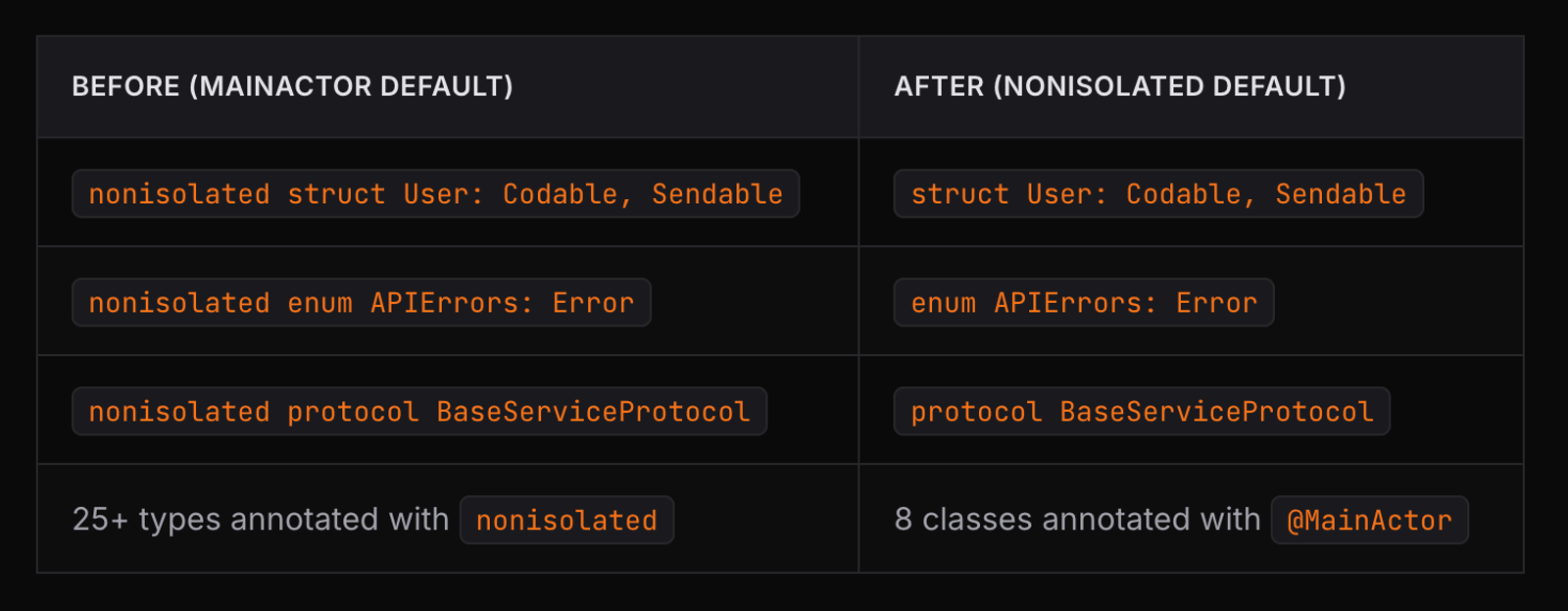
The code became dramatically cleaner. Model types look normal. The @MainActor annotations on classes serve as clear documentation: "This class touches UI state."
The Codable + @MainActor Trap
The single hardest bug to solve was the interaction between Codable and @MainActor. Here's the scenario that broke everything:
// BaseService (runs on any thread)
func postRequest<T: Codable>(...) async throws -> T {
    let decoded = try decoder.decode(T.self, from: data)
    return decoded
}

// AuthVM (on MainActor) calls it like this:
let response = try await service.postRequest(
    endpoint: .signIn,
    body: requestData,
    as: AuthResponse.self  // 💥 Error here!
)
The problem: when AuthResponse was @MainActor (due to the default isolation setting), its init(from: Decoder) method was also @MainActor. But JSONDecoder.decode() inside BaseService runs on a non-main-actor context. The compiler caught the mismatch.
Another twist: I initially tried to fix this by extracting the decode logic into ActivityEntryHelper, a helper type in the same file as my SwiftData @Model class. It didn't work because @Model makes the entire file inherit MainActor isolation.
The fix required putting the helper in a completely separate file:
/ ActivityEntryHelper.swift (separate file!)
enum ActivityEntryHelper {
    static func encodeMetadata(_ metadata: ActivityMetadata?) -> Data? {
        guard let metadata else { return nil }
        return try? JSONEncoder().encode(metadata)
    }

    static func decodeMetadata(_ data: Data?) -> ActivityMetadata? {
        guard let data else { return nil }
        return try? JSONDecoder().decode(ActivityMetadata.self, from: data)
    }
}
Gotcha
SwiftData's @Model macro makes the class (and everything in the same file context) MainActor-isolated. If you need nonisolated helpers that work with Codable types, put them in a separate Swift file.The Mental Model That Made It Click
After days of debugging, here's the mental model that finally made everything make sense. Swift 6 concurrency has two core concepts, and they apply at different stages:
1. nonisolated = "I can be created anywhere"
When a type is nonisolated, its initializers and protocol conformances (like Codable) can be called from any context. The JSONDecoder on a background thread can call init(from:). The main thread can create instances directly. No restrictions.
2. Sendable = "I can be passed across boundaries"
When a type is Sendable, an instance can be safely transferred from one actor to another. The value won't be corrupted because either it's copied (value types) or it has internal synchronization (reference types).
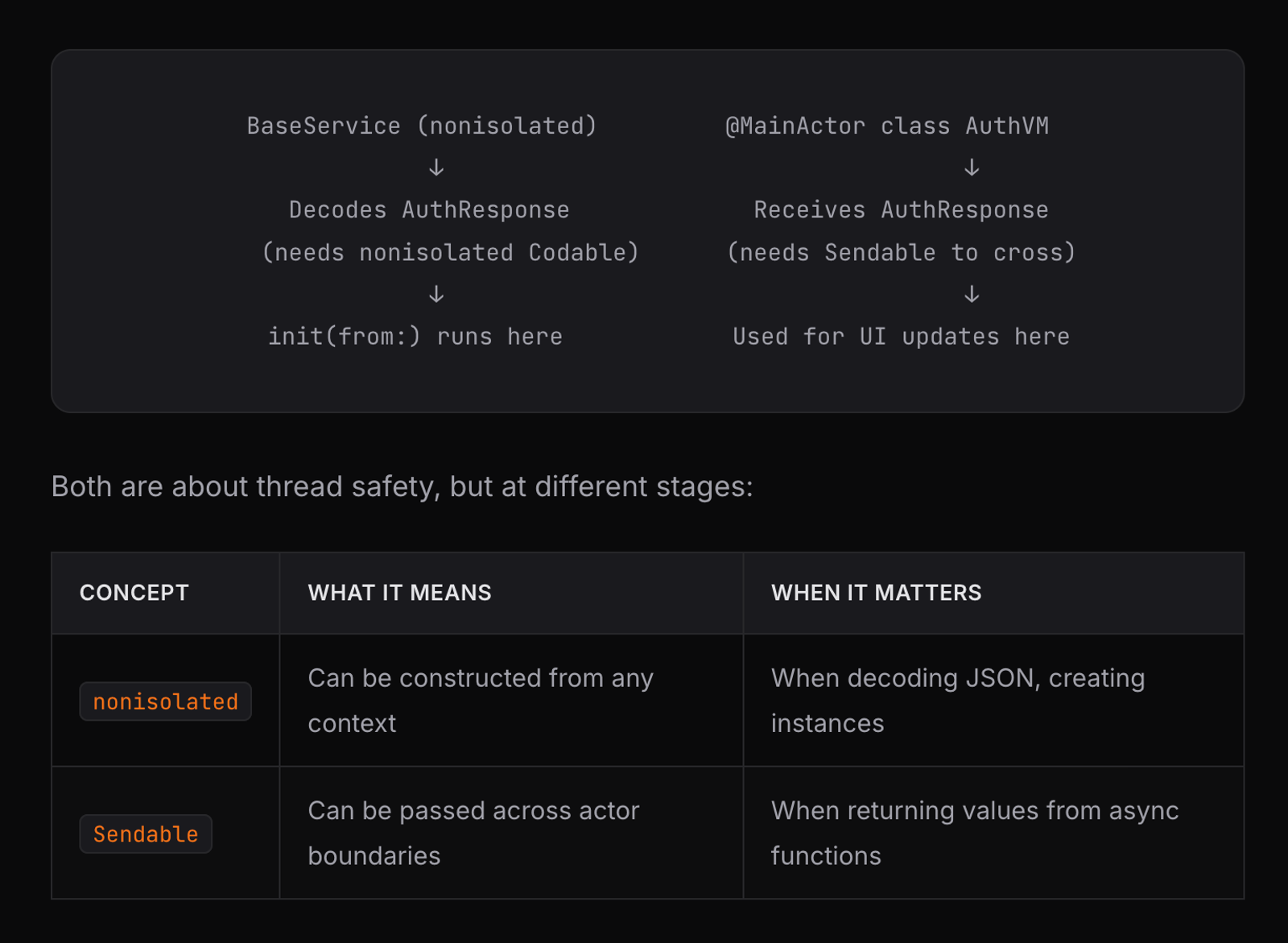
For structs with value-type properties, you get both for free. Nonisolated by default (standard Swift 6), and Sendable auto-inferred by the compiler. Zero boilerplate needed.
The Final Architecture
After all the refactoring, here's what the concurrency architecture looks like:
Classes with @MainActor (8 total)
These are the classes that touch UI state — they have @Published properties or update SwiftUI views:
@MainActor final class ActivityTrackingService: ObservableObject { ... }
@MainActor final class ActivityTrackingViewModel: ObservableObject { ... }
@MainActor final class SyncManager: ObservableObject { ... }
@MainActor final class NetworkMonitor: ObservableObject { ... }
@MainActor final class MenuBarToastManager: ObservableObject { ... }
@MainActor final class WindowTrackerService { ... }
@MainActor final class BrowserTrackerService { ... }
@MainActor @Observable class AuthVM { ... }
Plain structs and enums (nonisolated by default)
Model types, API types, error types — all plain, clean, no annotations needed:
struct AuthModel: Codable, Sendable { ... }
struct AuthResponse: Codable, Sendable { ... }
struct User: Codable, Identifiable, Sendable { ... }
struct ActivityRecord: Codable, Identifiable, Sendable { ... }
struct BulkActivityPayload: Codable, Sendable { ... }
enum APIErrors: LocalizedError, Sendable { ... }
enum APIEndPoints: Sendable { ... }
protocol BaseServiceProtocol: Sendable { ... }
The one exception: nonisolated on a method
@MainActor
final class BrowserTrackerService {
    // This method MUST opt out of MainActor
    // because AppleScript blocks for seconds
    private nonisolated func runAppleScript(_ script: String) async -> String? {
        // Runs on background thread via DispatchQueue.global()
    }
}
Build Result
0 errors. 0 warnings. 27 Swift files. Full Swift 6 strict concurrency compliance.
Key Lessons
If you're about to migrate your app to Swift 6, here's what I wish someone had told me:
1. Check your Default Actor Isolation setting first
Go to Build Settings → search "Default Actor Isolation." If it's set to MainActor, you'll need nonisolated on every model type. Consider switching to the standard nonisolated default and explicitly adding @MainActor where needed.
2. Structs are your best friend
Value types with value-type properties are automatically Sendable and nonisolated by default. They just work across actor boundaries with zero annotation overhead.
3. @MainActor is for classes that update UI
If a class has @Published properties, @State, or directly drives SwiftUI views, mark it @MainActor. Don't sprinkle it everywhere — be intentional.
4. Timer closures escape actor isolation
Always wrap timer callbacks in Task { @MainActor in } when they touch actor-isolated state. This is one of the most common Swift 6 migration issues.
5. @Model files contaminate everything
SwiftData's @Model macro makes the class MainActor-isolated. Helpers in the same file inherit this. Put Codable helpers in separate files.
6. Sendable is documentation for structs
Swift auto-infers Sendable for value types. Writing it explicitly is optional but valuable as documentation for your team.
7. nonisolated on methods = opting out of an actor
The only time you need nonisolated on a method is when it's inside an @MainActor class and needs to run off the main thread.
The End Result
DeskTimers now compiles under Swift 6 strict concurrency with zero errors and zero warnings. The architecture is cleaner than before the migration. Every class has a clear isolation domain. Every model type is freely usable across threads.
The Swift 6 migration wasn't just about silencing compiler errors. It forced me to truly understand how data flows through my app, where thread boundaries exist, and which types need protection. That understanding made the entire codebase more robust.
Swift 6 concurrency is hard. The error messages are cryptic. The mental model takes time to build. But once it clicks, you'll never write unsafe concurrent code again. And that's the whole point.
The compiler caught every potential data race at build time. Not at 2 AM when a user reports a mysterious crash. That's worth the struggle.

Pardip Bhatti
My expertise spans modern frameworks and technologies, including React, React Native, Swift, SwiftUI, UIKIT, MVVM Architecture.